Virtual Machines &
Workloads Integration

VMware Carbon Black · 2020–2021

Expanding a cybersecurity product into an entirely new market — virtualised infrastructure — after a major acquisition. New personas, new terminology, two data streams, and a compressed timeline between two companies with very different ways of working.
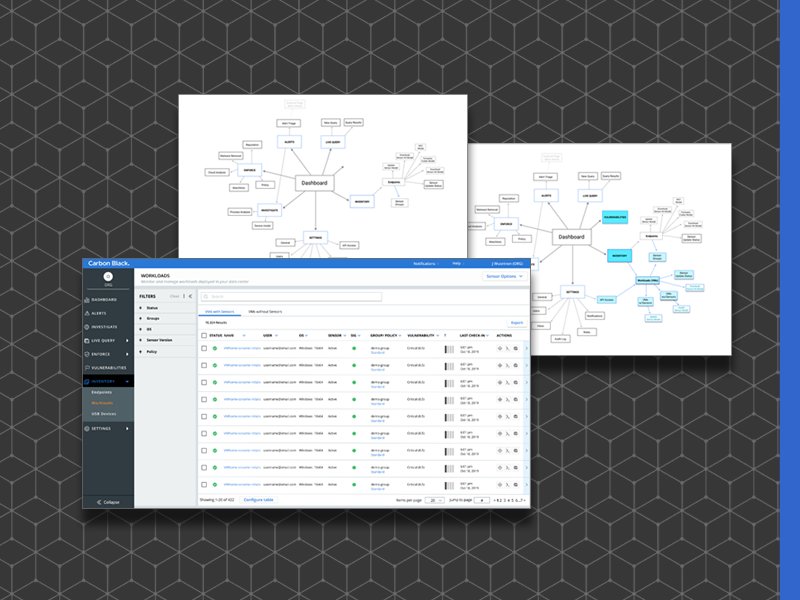
Workloads Inventory — VMs without Sensors

Project Snapshot

The Problem
After VMware acquired Carbon Black, the security product needed to extend protection to VMware's virtualised infrastructure. New personas, new shared terminology, and a new aligned process — just two mismatched engineering teams, a compressed timeline, and an entirely new technical domain.
My Goal
Take ownership of a mid-stream handoff from a VMware designer unfamiliar with the CB product — learning virtualisation from scratch while designing two new inventory pages and a sensor automation feature across two company cultures.
The Team & Mandate
A cross-company team spanning CB and VMware engineering, a Product Owner, and me as the sole UX designer. The project ran in AgileFall — Agile sprints inside a Waterfall delivery structure — with engineering dependencies outside our control.
  • Create a Workloads section inside Inventory without disrupting existing Endpoints users
  • Design two inventory pages for VMs with and without sensors, each with appropriate data models
  • Design a first-ever automated sensor install flow — replacing a manual command-prompt process
  • Define new personas for virtualisation/IT admin audiences
  • Ship on schedule to meet cross-company engineering dependencies
Outcomes

Shipped on schedule. The security business unit expanded into a new market. User testing validated core flows and the architecture enabled faster Container and Cloud integrations that followed.

Users found Workloads successfully — navigation placement validated
Expected inside Inventory
Sensor install automation was understood and welcomed by users
Users relieved manual install wasn't removed
New filters satisfied sensor group needs once discovered
Discoverability documented as a future improvement
Design Process
Domain Learning
Personas
IA Architecture
Wireframes
Wireflows
User Testing
Visual Design
My Role
Lead UX Designer
Company
VMware Carbon Black
Timeline
2020–2021
Platform
Enterprise Web App
Team
UX + Research + UI Dev + Offshore Eng

Research & Insights

The biggest research challenge on this project wasn't conducting studies — it was learning the domain fast enough to design for it. Virtualisation has its own deep technical vocabulary: hypervisors, VMware Tools versions, sensor eligibility, agentless vs agent-based protection. I had to understand what these meant for users before I could design anything meaningful.

The existing CB personas were security analysts and IT admins managing physical endpoints. Workloads introduced a new persona: the virtualisation admin or vSphere operator — someone who manages the VM infrastructure itself and may have different tools, workflows, and mental models from the security-first CB users.

Two Completely Different Data Streams
VMs with sensors had rich security data — identical in shape to the existing Endpoints data model. VMs without sensors had almost none — just eligibility status, VMware Tools version, and install readiness. These couldn't share a single view because there was a significant lift to making them compatible on a single screen. Stakeholders valued delivery vs ideal use case.
A VMware Tools Release Dependency
The automated sensor installation feature depended on a specific version of VMware Tools being installed on each VM. This created eligibility complexity — not all VMs could use the new automated flow. Communicating eligibility clearly to users became a core design problem.
"Workloads" Wasn't Meaningful to Users
User testing revealed that "Workloads" as a label didn't resonate with the target audience. The term was chosen by senior management and wasn't changeable — so the design had to compensate with clear navigation placement, descriptive subtitles, and contextual onboarding.
Different Platform, Different Install Path
Endpoint users had no automated sensor install — it was command-prompt only. Workloads got auto-install first because the implementation lift was lower for VMs. The design challenge was keeping the Workloads UI close enough to the Endpoint experience that existing users wouldn't feel the inconsistency — while still surfacing the new capability clearly for the virtualisation admin audience.

Wireflows

Wireflows documented the full interaction sequences for the two most complex flows: the workloads inventory navigation, and the appliance setup — these were mission critical to get design and development marching forward together.

Wireframes

The information architecture went through five iterations as engineering constraints clarified what was actually buildable. The gallery below shows the full evolution — from the original Endpoints-only structure through to the final separate-page approach that shipped.

With the IA resolved, wireframes focused on the two core inventory pages and the sensor installation flow. The VMs without Sensors page was the most novel design challenge — it needed to clearly communicate why data was absent and what action would fix it.

System Maps

The system maps show the before/after — from an Endpoints-only inventory to a scalable architecture that accommodated Workloads and laid the foundation for Containers and Public Cloud — integrations I also worked on.

Design Decisions

The central design challenge was integrating a new technical domain into an existing product without disrupting the mental models of current users — while making the new features clear and discoverable for the virtualisation admin audience.

01
Workloads lives inside Inventory, not as a top-level nav item
Placing Workloads as a sub-section of Inventory (alongside Endpoints) was the right mental model — admins already thought of their VMs as part of their asset inventory. This avoided polluting the main navigation and gave a clear scaling path for future workload types (Containers, Cloud).
02
Two separate pages — not tabs, not one merged view
VMs with sensors and without sensors have fundamentally different data models and action sets. Forcing them into one view would have created a confusing mix of present and absent columns. Two pages let each view focus on what's relevant — security data for sensored VMs, eligibility and install status for unsensored ones. Tabs were considered but dev confirmed filters and search couldn't be shared, making separate pages the right call.
03
Sensor installation as a contextual action, not a workflow interruption
The automated install is initiated from the VMs without sensors page — in context, where the user already understands what they're looking at. The design shows eligibility, current status, and progress in-line rather than redirecting to a separate installation wizard. This kept the flow lightweight and familiar to the existing CB interaction model.
04
Sensor groups filtering preserved — and improved
The left-panel Sensor Groups filter that existing CB users relied on wasn't brought over to Workloads initially. User testing flagged this. The new design retained equivalent filtering capability while adding new filter dimensions specific to VMs (eligibility, VMware Tools version). Once users discovered the new filters they were satisfied — but discoverability was a documented future improvement item.

Final Design

The final designs shipped two new inventory pages and a sensor installation flow — all integrated into the existing CB product navigation without disrupting the Endpoints experience. The visual design followed the established CB component system with workloads-specific additions for eligibility and install status.