Cybersecurity Analyst
Workbench

VMware Carbon Black · 2018–2021

Building a purpose-built internal tool for security analysts to monitor customer environments, automate threat communications, and replace a fragmented manual process spread across multiple disconnected systems.

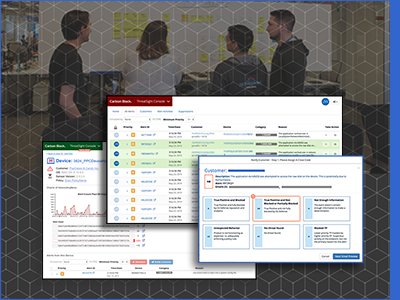
ThreatSight Console — Final Alert Dashboard · VMware Carbon Black

Project Snapshot

The Problem
Security analysts were managing critical threat communications and customer tracking through a patchwork of Google Sheets, Python scripts, and manual emails — a process rife with errors and one that a previous tool attempt had already failed to fix.
My Goal
Design an internal application from scratch that will serve as a more efficient task management and partially automated email process — one that analysts would actually adopt after already abandoning an earlier attempt.
The Team & Mandate
Three full-stack engineers, a Product Owner, a Product Manager, and me. The system was kept architecturally separate from the main product — which gave us the freedom to move fast without platform restrictions.
  • Replace the Google Sheet tracking system with a purpose-built analyst workbench
  • Automate customer email notifications to eliminate manual errors
  • Build analyst trust by involving them directly in design sprints throughout the process
  • Deliver a functional application iteratively within a scrum process across 3 program increments
Outcomes

The application was relied on by analysts for several years after delivery. The trust problem was solved not by features, but by process — weekly design reviews and direct collaboration turned a team that had abandoned one tool into advocates for the next.

<1 yr
Functional application delivered iteratively across 3 program increments
Immediate analyst adoption at launch
4 → 1
External systems replaced by a single workbench
Google Sheets, Python app, CSR, Outlook — all consolidated
0
Manual email errors after automation shipped
Wrong-customer emails eliminated entirely
Killer Feature

Alert ownership by avatar click — analysts claim an alert simply by clicking their initials. No assignment workflow, no Google Sheet.

"I don't even think about it, it just works."
— ThreatSight analyst
Design Process
Contextual Inquiry
Design Sprints
Wireframes
Delivery & Adoption
My Role
Lead UX Designer
Company
VMware Carbon Black
Timeline
2018 – 2021
Platform
Internal Web App
Team
Solo UX + 6-person Scrum

Research & Insights

Personas

The product's users were internal security experts represented by two personas, Sarah (SOC Analyst) and Adam (Security Analyst). Aligning the product with these personas was useful for involving our analysts in user testing and design feedback, making them a valuable resource for our UX team.

Interviews

We understood there was a trust issue with the initial system, so the Product Owner and I interviewed the Analysts to understand their daily tasks and software concerns. We found that they were pulling data from the system and managing processes using external systems like Google Sheets, leading to past errors and potential future issues.

Process Flows

Process flow diagrams captured the before and after state of the analyst workflow across each program increment — making the UX impact visible to product leadership and the engineering team in a language they could all read.

Wireframes

Wireframes were presented at every design sprint — weekly sessions where analysts could react, redirect, and validate before a single line of code was written.

Design Decisions

Automated Email Notification System
The highest-risk manual process was customer email. We designed a templated notification system that auto-populated customer data, threat details, and analyst notes — eliminating the copy-paste-into-Outlook workflow entirely. One click, correct customer, correct content.
Alert Ownership via Avatar Click
Analysts needed to claim alerts to avoid duplicating work across shifts. Rather than a complex assignment system, we designed a frictionless pattern: click your initials/avatar to claim an alert. Claimed alerts showed the owner's avatar clearly. The analyst response when asked how well it worked: "I don't even think about it, it just works."
Grouped Alert Views
Analysts working through high-volume queues needed to identify patterns across alerts. We designed flexible grouping by Threat ID, Priority, Organization, and Device — allowing analysts to batch-triage related alerts and dramatically reduce decision fatigue.
Activity View & Shift Handoff Notes
We built a structured Activity View with a dedicated Notes field — replacing the invisible verbal handoffs and scattered personal Google Docs. Notes persisted with the alert and were visible to the incoming shift, creating continuity across the 24/7 operation.
Contextual Inquiry After Each Program Increment
After each quarter of design sprints and builds, I visited the analysts' office to conduct contextual observations of their actual work. This wasn't theoretical testing — I watched analysts use the live system in real threat scenarios, which revealed friction the wireframe reviews had missed. Each PI's findings directly shaped the next quarter's priorities.

Final Screens

Being architecturally separate from the main product was a double-edged sword. It let us iterate and ship every sprint without waiting on platform dependencies — but it also meant no access to the component library. We made a deliberate call to prioritize speed and functionality over visual polish. The plan was always to bring the designs in line with the component library once the core system was complete and proven.